
Conference website and web app
We design your conference website and set up the web app in your event branding. The relevant user groups can access programs, bookings, posters, streams and contacts on smartphones, tablets and desktops.
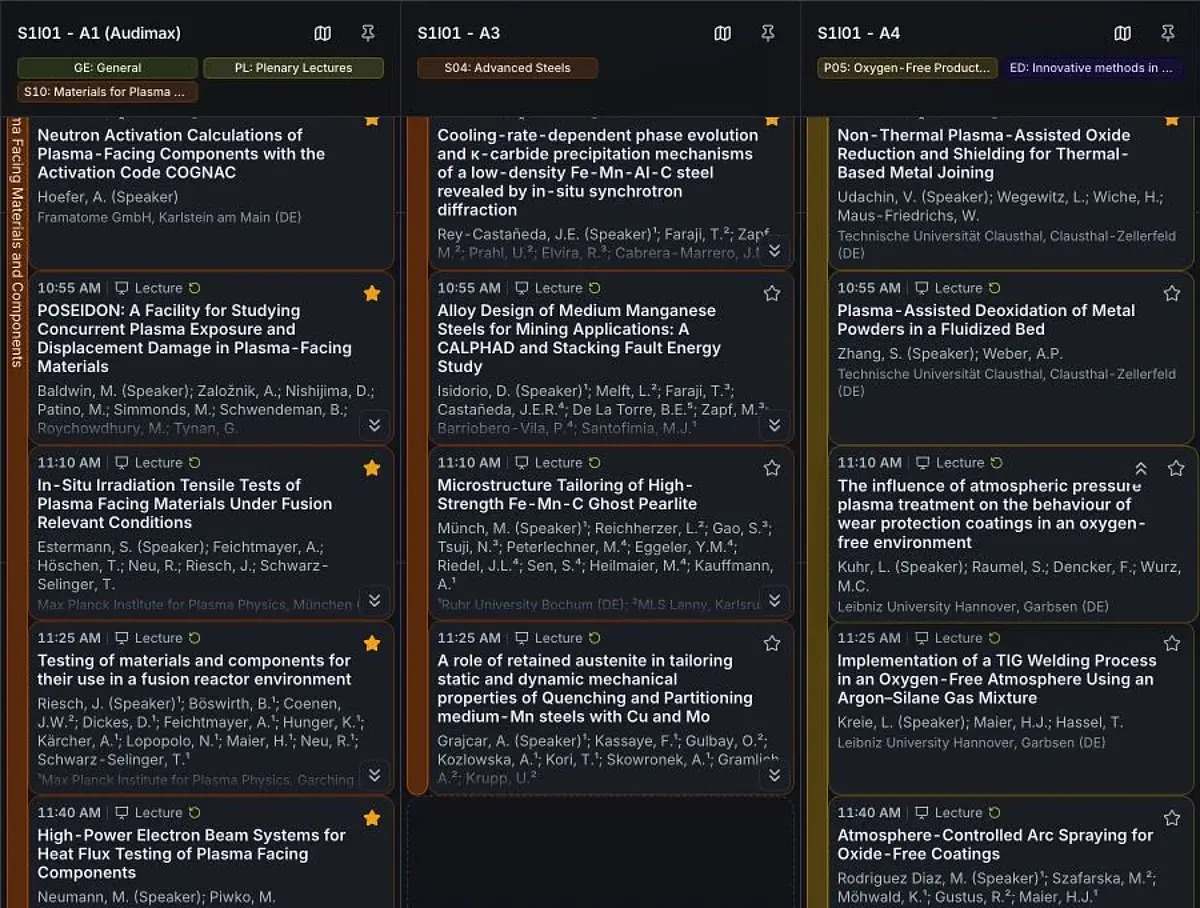

Plan your conference day
Parallel talks, several rooms and different interests: the web app makes the scientific program easier to navigate and helps participants plan their day.
- Explore the program: filter by sessions and rooms, read abstracts, find authors and open contributions directly.
- Save favorites: save individual talks and posters or follow a whole session and its subgroups. New contributions are included, and individual contributions can be excluded.
- My day: favorites, your own talks and confirmed chair duties appear in a personal timeline with times, rooms and required room changes.
- Spot overlaps: favorites scheduled at the same time are marked. Approved recordings can help you catch up later.
From the program to a conversation after the talk
Search by topic, person or institution and open the matching contribution.
The abstract, authors, location and time are attached to the contribution. Saving a talk as a favorite adds it to your daily schedule.
“My day” combines favorites and your own tasks. Your talk is marked with its time, room and your role as speaker.
The schedule shows parallel sessions side by side. Switch between list view, schedule and your personal day.
The poster gallery offers topic filters and posters you can enlarge. Participants can also vote when enabled.
“My attendance” contains your personal self check-in code. On site, it is used to print your name badge.
Open a released stream directly from the program. Recordings are available with the contribution once released.
Ask questions with the contribution and find other participants through their profiles. Contact requests and chats support personal conversations.
Illustration based on the web app. People, program and code are fictional; features and access are enabled for each event.
A website in your conference branding
Colors, logos, event information and scientific content are adapted to your conference. Sponsors can be included in the agreed positions.
We structure access for participants, submitters, reviewers and exhibitors. An introductory tutorial, help pages and the agreed personal support assist with questions.

Push reminders and offline access
Participants choose what interests them. The platform shows what is happening now and what is coming next.
- Personal remindersWhen enabled, a push notification provides a reminder shortly before a favorite contribution. The title, speaker, start time and room appear together, with direct access to the contribution or venue map.
- Track changesNotifications about changes to saved program items help keep personal plans current. The organizing team maintains the program centrally.
- On your smartphoneThe web app can be added to the home screen on supported devices. Saved program data remains available without a connection and is updated when online.
Push notifications and installation require device support and user consent. Streams and new content need an internet connection.
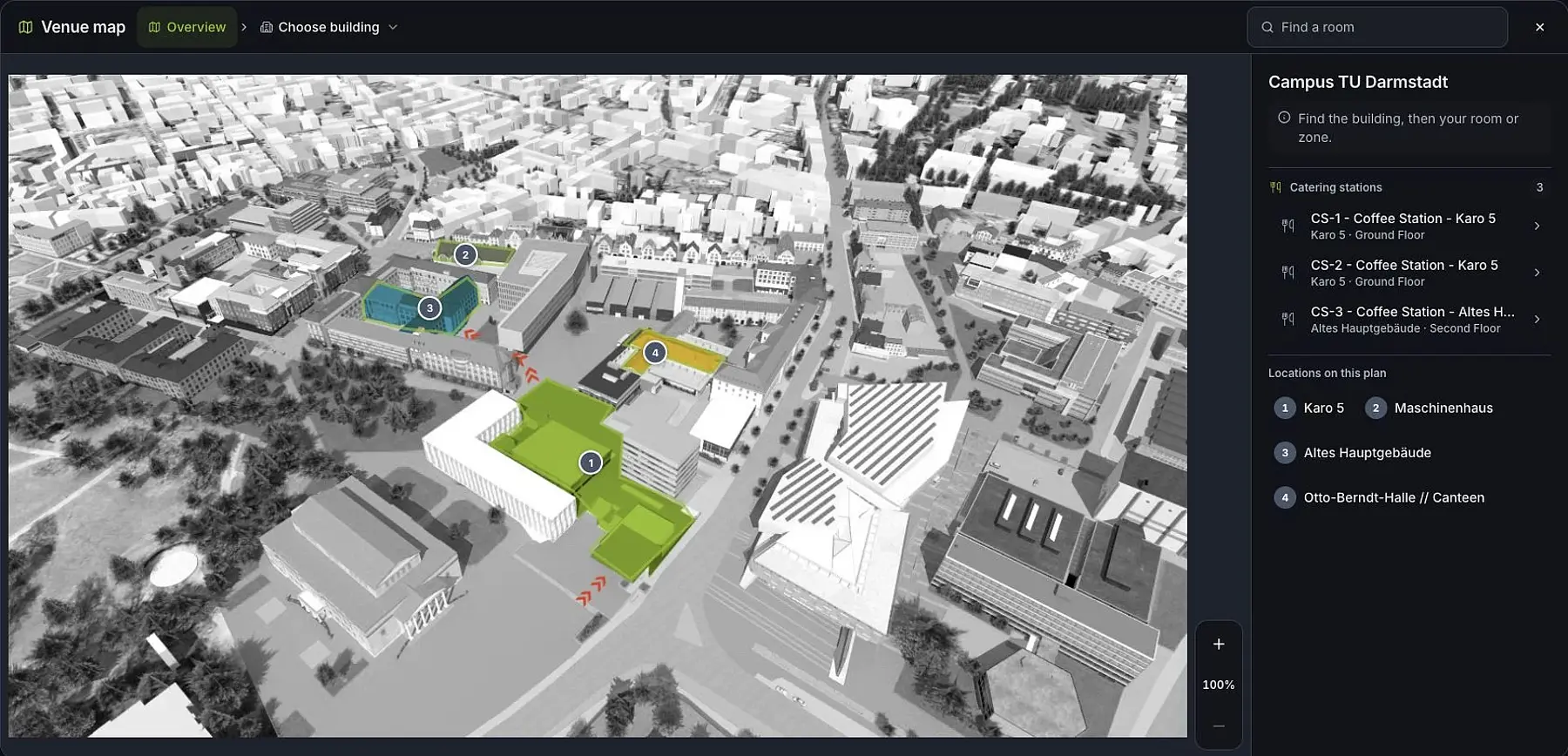
Find the room from the program
The platform connects the program and venue maps to help participants reach their next conversation or talk across a large site.
- From the overview to the building: the site overview, individual buildings and floors are linked.
- Open the relevant room: directly from the program, your personal day plan or a notice about the next session.
- Mark locations: lecture rooms, poster areas, exhibitions, catering and other important areas are marked on the plan.
- Return to the program: switch from a room to the sessions taking place there.
We prepare the supplied plans together with you. The view shows marked locations on the plan; it does not provide automatic indoor positioning.
Questions, forums and contacts
Questions and contacts are central to scientific conferences. The platform keeps both close to the relevant contribution.
- Questions on contributionsQuestions and discussions can be enabled for selected contribution types. Posts and replies are directly accessible; mentions and notifications lead back to the conversation.
- Meet peopleShared profiles link scientific contributions and chair roles. Contact requests and private chats provide a direct way to connect.
- Discuss togetherThe forum and optional video rooms provide space for professional discussions. Availability, posting periods and moderation are configured for the event.
Visible profile information and contact options depend on the event's permissions and access rules.

Notes, downloads and recordings
An interesting talk remains useful after the event. The platform connects personal notes with saved contributions and available recordings.
- Keep a record: collect private notes on contributions and sessions, sort them by time and export them for personal use.
- Find saved content: open favorites and missed content alongside your notes.
- Revisit a talk: open available replays. Planned recordings are distinguishable from content already available to watch.
On-demand access applies for the agreed period and approved contributions. Personal notes do not extend access to media or directories.
Approved files, abstract collections, event documents and sponsor information are available in the download area.
Which areas should your web app include?
Tell us the program size, audiences and functions you need. We demonstrate the web app using an example and set it up in your conference branding.