
Registration · Questionnaires · Payment

Online registration for conferences

Participation packages, individual questions, social programs and accompanying persons follow your rules and configured payment methods. We set up the booking process and support its administration.

For scientific conferencesIn-person attendance · Online tickets · Additional services
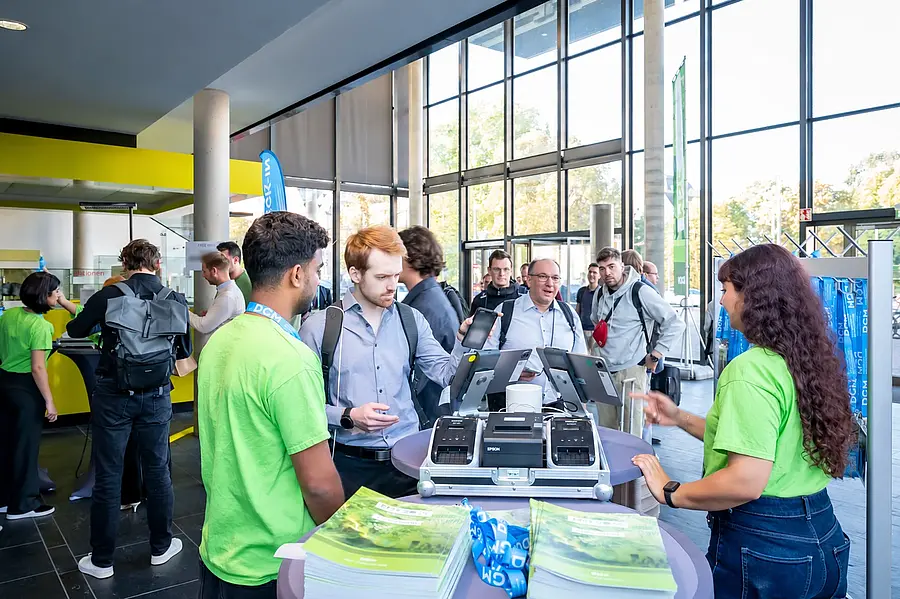
Participants and the event team at MSE 2026 self check-in
Self-check-in at MSE 2026
Example workflow
Your conferenceMy booking
Conference ticketIn person · All conference days
380 €
Conference DinnerAn additional service
40 €
Example total420 €
Suited to your eventYour rules. Your booking workflow.
How it works

From package selection to payment

Participants choose a package, answer the relevant questions and add services. A clear summary leads to booking and the configured payment methods.

We set up the steps for your conference, from a simple day ticket to multi-day participation with a social program and accompanying persons.

How registration works

Package, questions, guests and payment

Example · fictional data and prices
Choose attendance

How would you like to attend?

OnlineReleased livestreams
Digital conference program
190 € Example price

Prices and availability follow your booking periods.

Participants see the packages and price tiers available to them.

Questionnaires collect required information and show relevant follow-up questions.

Extras and guests are booked at the same time, with their own prices and participant lists.

The booking generates an invoice; payments received and the remaining balance are visible in the portal.

Booking rules

Packages, required items and allocations

A package consists of individual booking items. Each can have its own prices, quantities, conditions and available places.
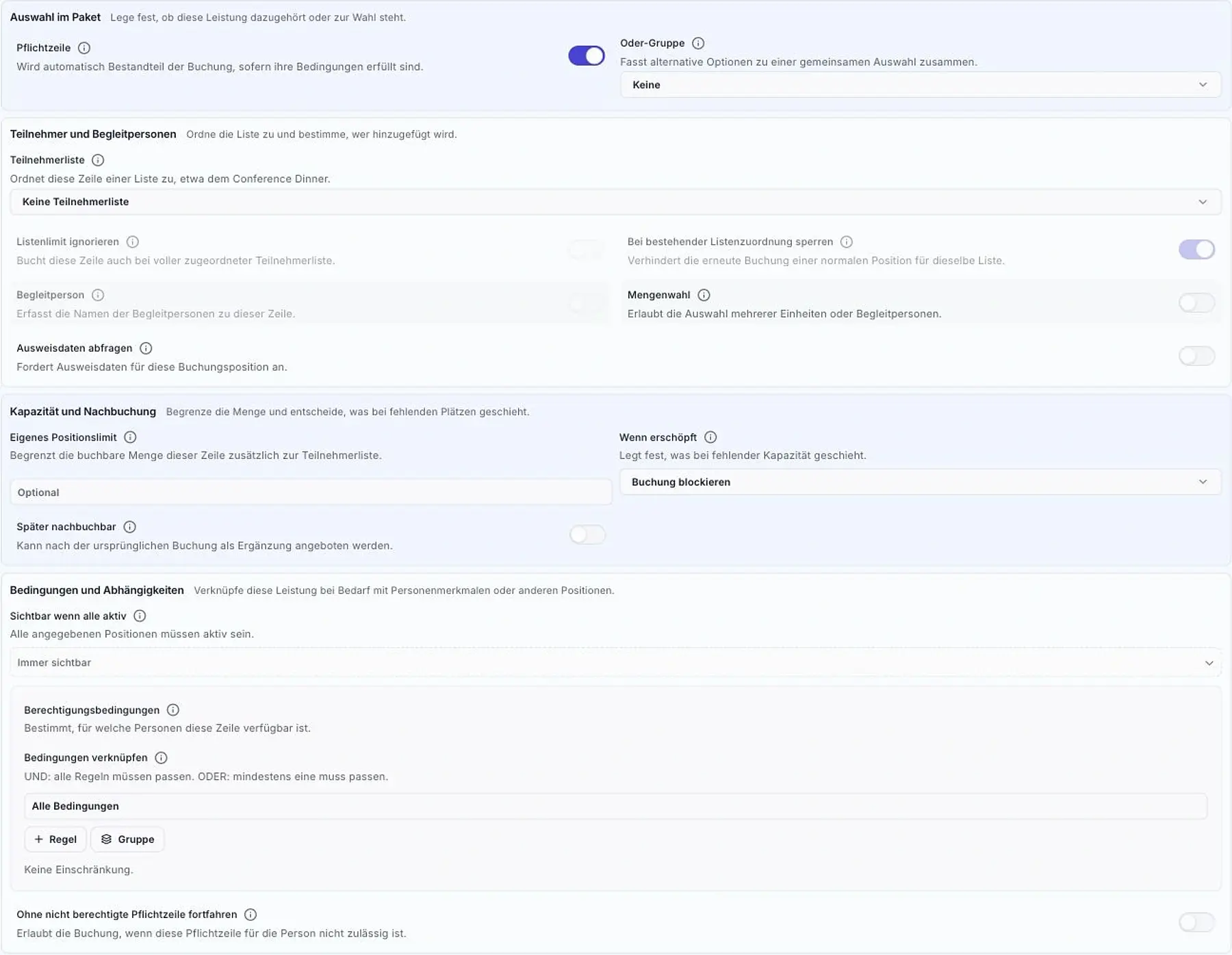
  • Required and optional items: fixed components, optional services and either/or groups for alternatives.
  • Dependencies: items become visible or required when the relevant selection is made; conditions can be combined using AND and OR.
  • Applicable rates: booking periods, participation format, membership and other stored attributes determine the available offers.
  • Allocations: quantity and participant-list limits, with configured waiting lists, account for limited places.
  • Reusable options: shared option sets can be used in several packages.
Original package designer view with required items, quantities, guests, capacity and conditional rules
Original view: booking item configuration. A section without personal data.
Make rules easy to understand

Which services belong to which booking?

Illustrative rule examples
Starting pointConference ticket

Your configured package

Automatically included

Required items

Conference attendanceRequired
Catering packageRequired

The service is included if the configured conditions are met.

Required items become part of the package when their conditions are met.

Alternative options are grouped in a single selection.

Dependencies link related items.

Item and participant-list limits control available places.

Illustrative rule examples. We set up the combinations for your event.

Questionnaires

Your own questions in the booking process

Collect the information you need to organize the event: professional interests, social program participation or dietary preferences.

Free text, yes/no, single-choice and multiple-choice questions can be combined with required fields and conditions. Follow-up questions appear for relevant answers. You decide where the questions appear in the booking process.

A questionnaire for your workflow

Questions suited
to the booking step

The questionnaire defines text, required fields, options and conditions.

Free textYes / NoSingle choiceMultiple choice
Illustration · Example answers
01 · Multiple choiceWhich topics interest you?
New materialsAnalysis
02 · Yes / NoWill you take part in the social program?
YesNo
Conditional follow-up questionWhich tour do you prefer?Institute tour
Accompanying persons

Book accompanying persons at the same time

Dinner, a guided tour or a social program: accompanying persons are linked to the booked service. Names, numbers and the corresponding participant lists are recorded together.

Participants and accompanying persons can have different prices. We adapt quantity limits, required details and rules to your offers.

MBParticipantMara Becker

Conference ticket

Conference dinner
JWGuestJonas Weber

For the booked dinner

Separate price and list entry
Attend together

Record guests
for each service

Names and numbers are recorded for each item. Participant and guest prices can differ.

Fictional people illustrate the workflow.
Invoicing and payment

Invoices and payment status for each booking

Booked services produce traceable invoice items. Products, tax rates and accounting codes are stored in the package.

The personal portal shows invoices and payment status. Depending on the setup, credit card, bank transfer or SEPA payments are available. Payments received and remaining balances stay linked to the booking.

Booked services and the required checks are also available for check-in and the issue of name badges and vouchers/tokens.

Original view of a conference package’s invoice items with service, article, price, accounting and tax
Original view: a package is split into invoice items. Historical configuration, not a price quotation.
BookingSelected services
InvoiceItems and tax
PaymentPayment received and balance
Check-inCheck booking status

Payment methods, deadlines and check-in checks follow the agreed configuration.

My participation

Bookings, contributions and documents in the portal

My participation brings together what each person needs for the conference. Guests, speakers, submission managers and session chairs see the information and tasks relevant to their role.

  1. Bookings and documentsBooked services, invoices and participation status are available in one place. In-person and online participation are clearly distinguished; the event address and map links help with travel planning.
  2. Contributions and responsibilitiesYour contributions, confirmed chair duties and relevant deadlines lead to the appropriate action. Presentations are uploaded through the designated submission process.
  3. After the eventAvailable attendance certificates remain accessible through the booking. Personal notes and approved media support follow-up.
Participants talking during MSE 2026
Personal conversations at MSE 2026
Access booking details at any time

Booked events in your personal account

After booking, participants find their events in the customer portal. They can open booking details, view available additional options and switch to the event platform. We define the available options for your event.
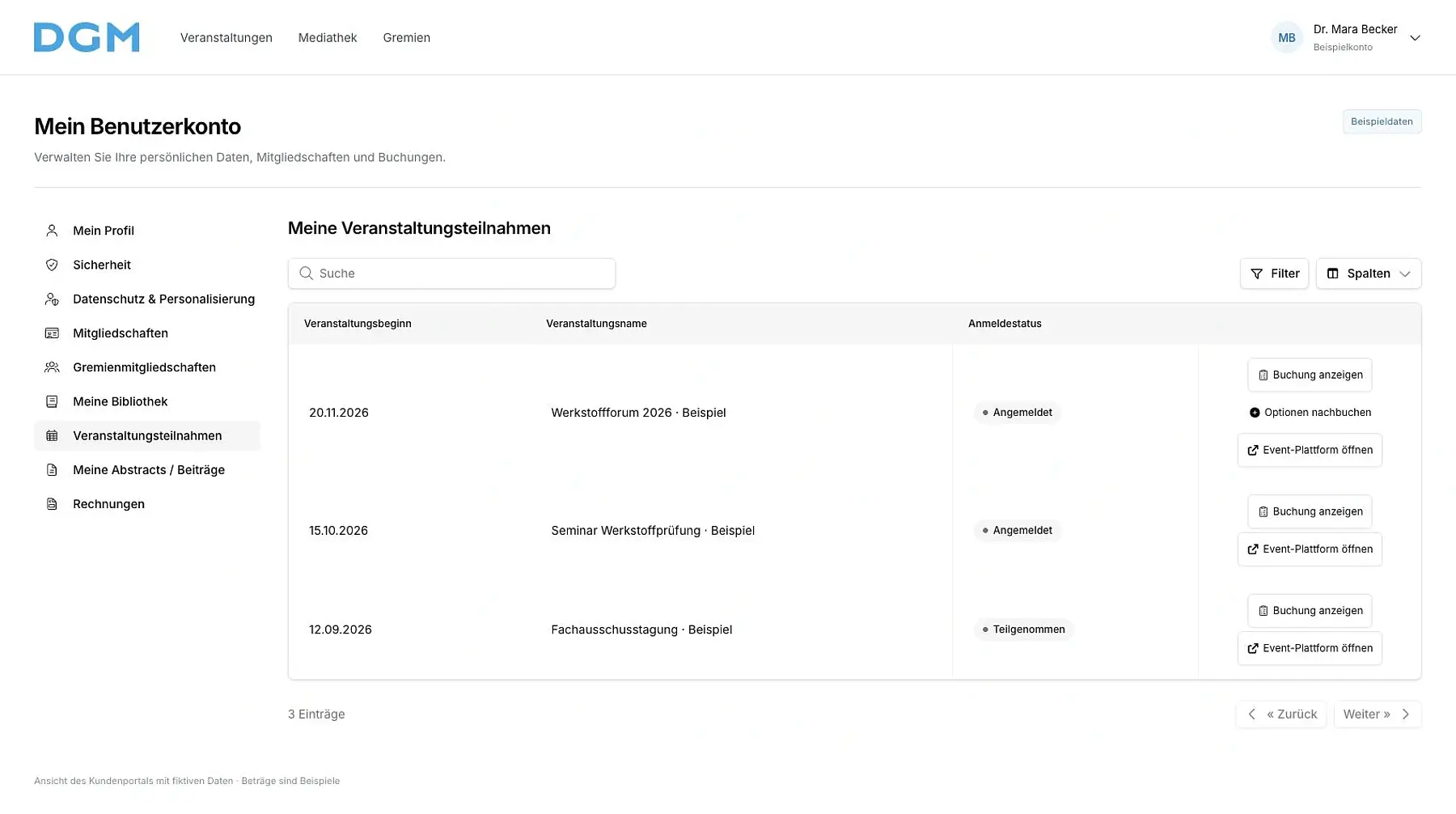
Booked events with details, extras and platform access, fictional example data
Attendance: booking details, available extras and access to the event platform. Fictional example data.
Related services

Related services for participants

Booking data provides the basis for invoices, event information, tickets and check-in.

Check-in and support

Check the ticket or QR code at check-in.
More about check-in Check-in and support

Billing and finances

Show the invoice and payment status with the booking.
More about billing Billing and finances

Conference website and web app

Access attendance, program and digital content.
More about the website and web app Conference website and web app
Next step

Which registration options do you need?

Describe the packages, audiences, allocations and additional services you need.

Discuss attendance options

Send a project inquiry with packages, capacity and audiences.
Send inquiry Discuss attendance options